
Matter: The universal smart home standard.
A vendor-agnostic way to connect smart home devices to any controller—and even to multiple controllers at once.
Designed for seamless, plug-and-play setup right out of the box.
That is, if your setup is just a basic router.
The story quickly changes when running multiple VLANs.
In this article, I'll explain how to run Matter successfully on a VLAN behind a firewall.
What Matter Needs to Function
- mDNS: Uses both IPv4 and IPv6 multicasts for devices to announce their presence and metadata.
- IPv6 Connectivity: Required for actual communication and control.
Configuring mDNS Across VLANs
- The Reflector: An mDNS reflector (like Avahi on Linux/BSD systems) is needed between VLANs to capture multicast messages and repeat them across linked subnets.
- Firewall Rules: Firewalls must explicitly allow multicast traffic to reach the mDNS reflector.
- IPv4 Multicast: Address 224.0.0.251, port 5353
- IPv6 Multicast: Address ff02::fb, port 5353
- Key Takeaway: While Matter relies solely on IPv6 for its actual communication layer, mDNS discovery still utilizes both IPv4 and IPv6.
Configuring IPv6 Connectivity Across VLANs
Historically UDP, and from Matter 1.5+ TCP as well, are used to communicate from the Matter Controller to the devices, and between devices.
- Routable IPv6 Addressing: Because IPv6 link-local addresses (fe80::/10) are non-routable and cannot cross VLAN boundaries, your network must use routable IPv6 prefixes—such as Unique Local Addresses (ULAs) (fd00::/8) or Global Unicast Addresses (GUAs)—assigned via SLAAC on both VLANs so devices can reach each other at Layer 3.
- Firewall Rules: Firewalls must allow traffic towards the devices—primarily focusing on port 5540 for operational traffic alongside stateful session tracking. This is especially important when the Matter Controller lives on a separate VLAN.
- The Isolation Advantage: Because Matter devices do not initiate outbound connections to the Controller, your Matter VLAN can stay heavily locked down. It can remain isolated from outbound internet access while safely accepting incoming controller commands and mDNS traffic.
Matter over Wi-Fi
- VLAN Mapping: The Wi-Fi SSID used for your smart devices should map directly to your designated Matter VLAN.
- The Commissioning Step: When adding a new device, your mobile phone usually needs to be connected to that same Wi-Fi network/VLAN, as those credentials are transferred to the device during setup.
- Client Isolation: Wi-Fi client isolation (or AP isolation) must be disabled, as it blocks wireless devices from communicating with one another.
Matter over Thread
- VLAN Alignment: The Thread Border Router should reside on the exact same VLAN as the Matter Controller.
- The Commissioning Step: Your mobile phone must be connected to that same Wi-Fi network/VLAN during setup.
- The Link-Local Trap: Commissioners (like Android) use IPv6 link-local addresses (fe80::) to talk directly to the Border Router. Because link-local addresses do not route, a separate routed VLAN will cause commissioning to fail—it must be the exact same Layer 2 network.
The Bluetooth Requirement (Universal)
- The Initial Handshake: Matter device commissioning relies on Bluetooth (BLE) for its initial pairing phase across both Wi-Fi and Thread devices.
- Phone vs. Server-Side Commissioning: If you are commissioning devices using a mobile app, your phone's built-in Bluetooth handles this process. However, if you are commissioning directly through a container or server-side controller interface, ensure the host system has direct access to a physical Bluetooth adapter or an active BLE proxy.
Example Use Case: Matter Commissioning Across VLANs
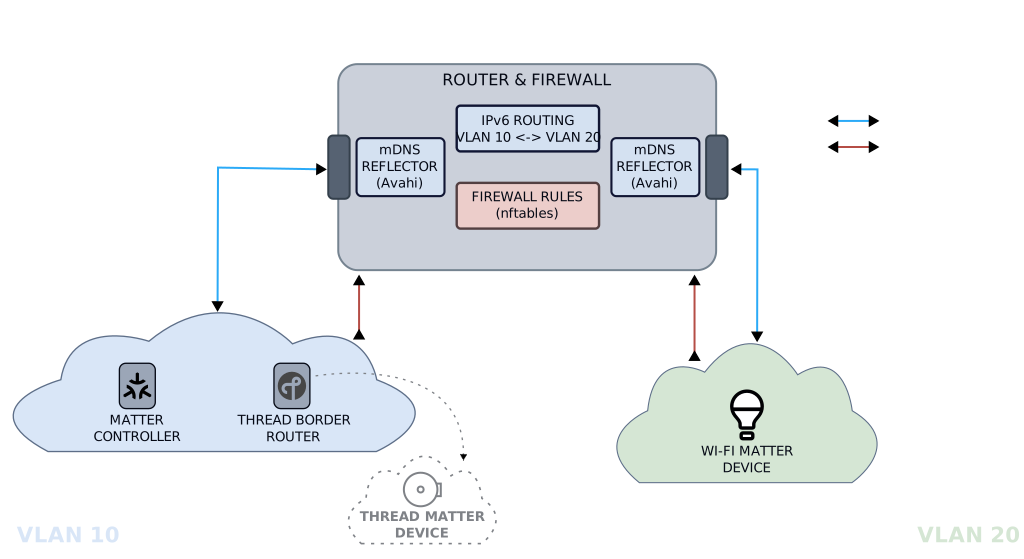
This scenario demonstrates how a multi-VLAN network handles Kubernetes-based Matter controllers, Thread Border Routers, and device commissioning.
1. Network Topology Example
- VLAN 10 (Controller & Border Router): Houses the Kubernetes Matter controller and the Thread Border Router.
- VLAN 20 (Matter Devices): Dedicated subnet for native Wi-Fi Matter devices.
2. Firewall Configuration Example (nftables)
In this example setup, the router running the nftables firewall also acts as the mDNS reflector, allowing it to bridge the multicast discovery packets between VLAN 10 and VLAN 20 alongside the firewall rules
- Kubernetes Input:
chain input_kubernetes udp dport 5353 accept comment "Allow mDNS (IPv4/IPv6 multicast discovery)" - Kubernetes Forward:
chain forward_kubernetes ip6 saddr $KUBERNETES_NODES_V6 ip6 daddr $MATTER_LAN_V6 accept comment "Allow Kubernetes Nodes to Matter IPv6 LAN" - Matter LAN Input:
chain input_matter udp dport 5353 accept comment "Allow mDNS (IPv4/IPv6 multicast discovery)"
3. Mobile Phone Commissioning Rules (Example Guidelines)
- Commissioning Matter over Wi-Fi:
- Action: Connect your mobile phone to VLAN 20.
- Reason: The mobile app passes the Wi-Fi credentials of the network it is currently attached to (VLAN 20) to the target device, ensuring the device provisions onto the correct subnet.
- Commissioning Matter over Thread:
- Action: Connect your mobile phone to VLAN 10.
- Reason: Thread commissioning relies heavily on IPv6 link-local communication (fe80::) directly with the Thread Border Router, requiring the phone to share the exact same subnet (VLAN 10).